


Introduction
Cutting geometry is one of those Blender tasks that seems simple until you have to do it dozens or hundreds of times.
A single opening, panel line, inset, or mechanical detail may take only a few seconds. Across a larger model, however, repeatedly creating cutters, positioning them, setting up Boolean modifiers, adjusting edge loops, and cleaning the resulting mesh can become a noticeable part of the modeling workload.
Blender already includes several capable cutting tools, including Loop Cut, Knife, Bisect, and the Boolean modifier. For many projects, those tools are all you need. A Blender cut addon becomes useful when the problem is no longer whether Blender can make the cut, but how many repetitive steps are required to make and revise it.
That is where tools such as BoxCutter, HardOps, Fluent, and lighter cutting add-ons can help.
In this guide, we will look at Blender's built-in cutting tools, how to cut an object in Blender using different methods, where Boolean tools fit into the workflow, and when a dedicated addon actually saves enough time to be worthwhile.
Key Takeaways
- Blender's native Loop Cut, Knife, Bisect, and Boolean tools cover most common cutting tasks.
- The best tool depends on the kind of cut you need, not simply which option is fastest to activate.
- BoxCutter is especially useful when a project involves repeated interactive Boolean cuts.
- HardOps complements Boolean-heavy workflows by helping manage modifiers and other hard-surface operations.
- Fluent is useful when cuts need to remain adjustable and parametric throughout the modeling process.
- A faster workflow is not just about creating cuts quickly. Revision time, modifier management, topology, and cleanup also matter.
- For occasional cuts, Blender's built-in tools are often faster than adding another addon to your setup.
TL;DR
If you are looking for a faster cuts Blender addon, start by deciding what type of cutting you actually do.
For a few straightforward edits, Blender's native Loop Cut, Knife, Bisect, and Boolean tools are usually enough. The Bisect tool is particularly useful for slicing geometry across a plane, while the Knife tool is better for custom paths and the Boolean modifier is suited to cutting holes or more complex shapes into objects.
For repeated Boolean modeling, BoxCutter removes much of the setup involved in creating and managing cutter objects. HardOps can support the resulting modifier-heavy workflow, while Fluent is useful when you want cuts to stay highly adjustable.
The fastest option is therefore not always an addon. It is the tool that reduces the most unnecessary work for the type of model you are building.
Why Cutting Operations Become a Bottleneck
Most Blender users do not struggle because Blender lacks ways to cut geometry. The slowdown usually comes from everything around the cut.
A typical Boolean cut can involve:
- creating a cutter object
- positioning and scaling it
- adding a Boolean modifier
- choosing the correct Boolean operation
- checking the modifier order
- adjusting the cutter
- managing visibility
- adding bevels or support geometry
- checking shading
- cleaning the mesh when necessary
None of these operations takes very long on its own.
The problem appears when the same sequence is repeated across a product, machine, vehicle, architectural asset, or detailed sci-fi model.
This is also why the fastest cutting tool is not necessarily the one that performs the first cut fastest. In production, revision time matters just as much.
A cut that takes ten seconds longer to set up but stays easy to reposition may save far more time later when the client or art director asks for changes. Conversely, keeping every cut procedural can add unnecessary complexity when the design is already final.
A good cutting workflow should therefore reduce both creation time and revision time.
Blender's Native Cutting Tools Are More Powerful Than Many Artists Realize
Before installing a Blender cut addon, it is worth understanding what Blender already provides.
The right built-in tool can often perform a job faster than setting up a more elaborate addon workflow.
Which Blender cut tool should you use?
A useful way to choose is to start with the result you need.
There is no universal best Blender cut tool. These methods solve different problems.
Loop Cut and Slide
Loop Cut and Slide is one of Blender's most useful mesh-editing operations, particularly when working with clean quad-based topology.
The default Blender Loop Cut shortcut is Ctrl + R in Edit Mode. Hover over the mesh to preview the loop, click to confirm it, and then slide it into position.
You can also use the mouse wheel before confirming to create multiple loop cuts at once.
Loop Cut works especially well when you need to:
- add supporting geometry
- control subdivision
- create evenly distributed sections
- prepare an area for further extrusion or editing
Its main limitation is that it follows the existing topology. If Blender cannot find a continuous quad loop, the cut may stop or travel somewhere you did not expect.
That is when Knife, Bisect, or a Boolean workflow may be more appropriate.
Knife Tool
The Knife tool is useful when you need to draw a cut manually rather than follow the existing edge flow.
It works well for custom shapes, localized edits, and situations where Loop Cut cannot reach the desired area.
One particularly useful option is Cut Through. When enabled, the Knife tool can cut through geometry on the far side of the object instead of affecting only visible faces.
This is helpful when you need a custom Blender knife tool cut through a complete mesh rather than making the same edit from multiple views.
The Knife tool gives you a lot of control, but that control also means more manual input. If you are repeatedly cutting the same type of mechanical recess or opening, a Boolean workflow may be faster.
Bisect Tool
The Blender Bisect tool is one of the simplest ways to cut an object across a plane.
In Edit Mode, Bisect lets you draw a line through the selected mesh. Blender creates new geometry where that plane intersects the object.
It can also remove geometry from either side of the cut and optionally fill the resulting opening.
That makes the Blender Bisect tool useful for tasks such as:
- splitting an object into two sections
- trimming off part of a model
- creating a straight cross-section
- removing geometry above or below a plane
- preparing models for further editing
If you are trying to cut a model cleanly from one side to another, Bisect can be much faster than creating a cutter object and setting up a Boolean modifier.
This is a good example of why an addon is not always the fastest option. For one clean planar slice, the native Blender Bisect tool is difficult to beat.
Boolean Modifiers
For more complex cuts, Blender's Boolean modifier is usually the most flexible built-in option.
Instead of drawing the cut directly into the target mesh, you use another object as the cutter.
The three main Boolean operations are:
- Difference, which subtracts one object from another
- Union, which combines volumes
- Intersect, which keeps the overlapping area
If you are trying to cut a hole in an object in Blender, Difference is usually the operation you want.
For example, a cylinder can be passed through a solid object and used as the Boolean cutter to create a round hole. The same method works with custom shapes, making Booleans useful for vents, sockets, windows, panel recesses, mechanical openings, and more.
The biggest advantage is that the cutter can remain separate from the main model. You can reposition or resize it later without rebuilding the cut.
That makes Boolean modeling particularly useful during design stages when proportions are still changing.
How to Cut an Object in Blender: Choose the Method by the Job
People searching for how to cut an object in Blender are often shown several different methods without much explanation of why one method is better than another.
A simple rule is:
Use direct mesh tools for simple, final edits. Use Boolean tools when the shape of another object is driving the cut or when the cut may need to change later.
For example:
Cutting a model in half
Use Bisect if you simply want to slice through a model along a plane.
Adding a custom line across a surface
Use the Knife tool when you want to draw the path yourself.
Adding subdivision support
Use Loop Cut when the topology already forms a suitable quad loop.
Cutting holes in a mesh
Use a Boolean Difference with a separate cutter object.
Making many holes, panels, and recesses
This is where a Boolean addon such as BoxCutter can start saving meaningful time.
Knowing the difference is more useful than trying to force every modeling problem through the same tool.
SimpleCut: A Lightweight Cutting Workflow
SimpleCut takes a relatively straightforward approach to cutting.
Rather than trying to become a complete hard-surface modeling system, it focuses on making common object-cutting and Boolean operations quicker to access.
Where SimpleCut works well
- quick concept models
- product visualization
- mechanical parts
- simple hard-surface assets
- artists who want fewer steps without adopting a large toolkit
Advantages
- relatively small learning curve
- lightweight workflow
- fast setup
- less interface complexity than a larger hard-surface suite
Limitations
For larger projects with many cutters and long modifier stacks, artists may eventually want more extensive Boolean management and hard-surface tools.
This is an important distinction when choosing a Blender cut addon. A small tool can be faster if your problem is small. More features do not automatically mean a faster workflow.
BoxCutter: One of the Most Popular Blender Cutting Addons

For artists making repeated Boolean cuts, BoxCutter for Blender is one of the best-known dedicated options.
The traditional native workflow often requires you to create a separate cutter object, position it, add a Boolean modifier to the target, select the cutter, and then manage the resulting objects and modifiers.
BoxCutter compresses much of that process into an interactive cutting workflow.
Instead of preparing every cutter manually, you can draw cutting shapes directly against the model and see the result as you work.
Why artists use BoxCutter in Blender
BoxCutter is particularly useful for:
- repeated Boolean cuts
- vents and panel recesses
- mechanical forms
- sci-fi surfaces
- concept modeling
- product forms
- non-destructive design exploration
Its real advantage is not that Blender cannot make the same cuts without it. Blender can.
The advantage is reducing the number of repeated setup steps between deciding to make a cut and seeing the result.
That difference becomes much more noticeable after the twentieth or fiftieth cut than it does on the first one.
BoxCutter versus Blender's native Boolean tools
For an occasional Boolean cut, Blender's built-in tools are perfectly practical.
If you need to cut one opening into an architectural wall, for example, creating a cutter and adding a Boolean manually may be faster than learning a specialized addon.
BoxCutter becomes more compelling when Boolean operations are central to the modeling style.
A useful way to think about it is:
Native Boolean: good when Boolean cutting is one operation among many.
BoxCutter: useful when Boolean cutting is the workflow.
This is also why BoxCutter is particularly associated with hard-surface modeling. Hard-surface projects often contain repeated recesses, panels, openings, grooves, and mechanical details, so the time saved compounds quickly.
For a broader look at tools beyond cutting, see our guide to the best Blender plugins and add-ons.
HardOps: Extending the Workflow Beyond Cutting

HardOps solves a slightly different problem.
BoxCutter is primarily concerned with creating cuts quickly. HardOps helps manage a broader hard-surface workflow once the model begins accumulating modifiers, bevels, Booleans, and other operations.
Its tools cover areas such as:
- modifier management
- Boolean utilities
- sharpening
- bevel workflows
- mesh operations
- workflow automation
This distinction matters because creating a Boolean is only one part of working with Boolean-heavy models.
As the object becomes more complicated, you may spend just as much time navigating modifier stacks, checking bevel behavior, adjusting shading, and organizing cutters as you spend drawing new cuts.
That is one reason BoxCutter and HardOps are commonly used together.
You can think of BoxCutter as accelerating cut creation, while HardOps helps reduce friction around the larger hard-surface workflow.
If you are only making occasional holes and openings, that wider toolkit may be unnecessary. If most of your work involves mechanical or Boolean-heavy assets, the time savings can become more significant.
Fluent: A Powerful Alternative for Boolean Modeling
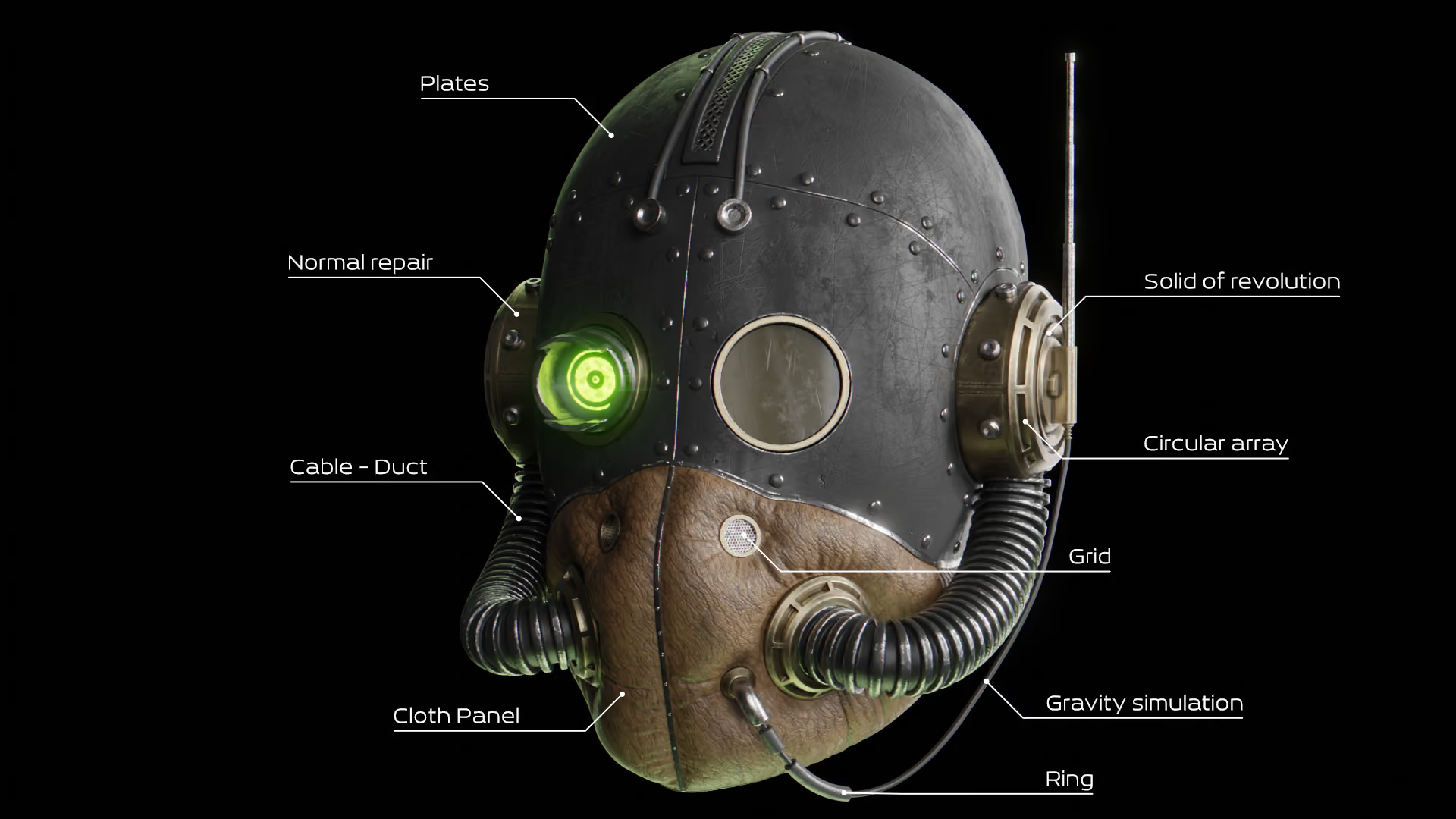
The Fluent Blender addon also focuses heavily on Boolean-based modeling, but its workflow emphasizes keeping operations editable.
That can be particularly useful when building:
- mechanical objects
- product designs
- technical assets
- adjustable panel details
- models likely to go through multiple design revisions
A common mistake in speed-focused modeling is to optimize only for how quickly the first version can be created.
In client work, the real test often comes later.
If a panel has to become wider, a recess has to move, or the size of an opening changes after materials and lighting have already been developed, editable cutters can save much more time than the few seconds originally gained by applying everything early.
That does not mean every Boolean should remain live indefinitely. Complex modifier stacks can become harder to manage as a project grows.
The useful principle is to keep operations non-destructive for as long as their dimensions are still likely to change.
Once a part of the design is stable, simplifying the model may make more sense.
MACHIN3tools: Faster Modeling Through Workflow Optimization

MACHIN3tools is not specifically a Blender cutting addon.
Its value comes from reducing friction across everyday modeling tasks through features such as:
- selection tools
- navigation improvements
- context-sensitive actions
- pie menus
- general modeling utilities
Because of that, MACHIN3tools should not be treated as a direct alternative to BoxCutter or Fluent.
It is more relevant when cutting is only one part of a larger workflow and you want to reduce time spent on many smaller repetitive actions.
The distinction is useful because not every workflow bottleneck requires a specialized tool.
If you make only five Boolean cuts during a project but perform hundreds of selections, transforms, visibility changes, and navigation actions, improving those common tasks may save more time than installing another Boolean addon.
Common Blender Boolean Problems and Cleanup
Boolean tools are fast, but they can also create problems if the cutter, target geometry, or surrounding modifier stack is not well prepared.
Some common Blender Boolean problems include:
- unexpected shading artifacts
- tiny faces around intersections
- overlapping or coplanar surfaces
- very thin geometry
- cutters that do not fully pass through the object
- bevel modifiers reacting badly to the new edges
- difficult topology around heavily detailed areas
The right fix depends on what the model is for.
For static hard-surface rendering, perfectly quad-based topology is not always necessary everywhere. If the object shades correctly, renders correctly, and remains manageable, rebuilding every Boolean result may simply create extra work.
For deforming assets, subdivision-heavy models, or geometry that will be edited extensively later, topology deserves more attention.
We cover those principles more deeply in our guide to topology in 3D modeling.
A practical Boolean cleanup check
Before spending time manually rebuilding a Boolean area, check:
- Does the silhouette look correct?
- Is the shading clean?
- Does the bevel behave properly?
- Will this area deform?
- Will the topology need further editing?
- Is the extra cleanup actually visible in the final result?
This sounds obvious, but it avoids a common production trap: spending more time repairing invisible topology than improving parts of the model that actually affect the image.
Choosing the Right Faster Cuts Blender Addon
There is no single best option for every project.
Choose Blender's native tools if...
You only make occasional cuts or need simple Loop Cut, Knife, Bisect, and Boolean operations.
For many Blender users, this should remain the default starting point.
Choose SimpleCut if...
You want a lightweight Blender cut addon that reduces common cutting steps without introducing a much larger hard-surface system.
Choose BoxCutter if...
Boolean cutting is a major part of your modeling workflow and you repeatedly create holes, panels, recesses, and mechanical shapes.
This is where BoxCutter's interactive workflow provides the clearest benefit.
Choose HardOps if...
You want more than a cutting tool and regularly manage Boolean-heavy hard-surface models, modifiers, bevels, and related operations.
Choose Fluent if...
You value parametric control and expect to keep adjusting cuts and design details throughout the modeling process.
Choose MACHIN3tools if...
Your main problem is general modeling friction rather than Boolean cutting specifically.
A practical production rule
Before installing another addon, count the repetitive actions it would actually remove from your normal work.
If an operation appears once per project, automation may not matter much.
If it appears fifty times in every model you build, even a small reduction in clicks, setup, or revision work can become meaningful.
That is usually a better way to evaluate an addon than looking at how many features it offers.
When Local Hardware Becomes the Bottleneck
Faster cutting tools solve one part of the production pipeline, but they do not necessarily make the entire project faster.
Boolean-heavy product and hard-surface scenes can become complex. Models may contain many objects, bevels, modifiers, high-resolution textures, reflective materials, and detailed lighting setups.
At that point, the bottleneck can simply move from modeling to viewport performance or final rendering.
One Blender project rendered with us by Classic Colors illustrates that broader problem well. Their team was receiving extremely high-poly CAD files that were difficult to work with in their previous software. After moving the projects into Blender, they found they could navigate and edit the heavy geometry much more effectively, eventually making Blender their main 3D application for much of their work. For animation and still projects that needed quick turnaround, they then sent the rendering to the cloud so their local machines were not tied up with final output.
You can read the full Classic Colors Blender case study here.
That is a useful reminder that workflow optimization happens at different stages.
A cutting addon can reduce the time spent creating the model. A Blender render farm addresses a different problem once the scene is ready to render.
The goal is not to use more tools. It is to remove whichever bottleneck is actually slowing down the project.
Final Thoughts
If you are searching for a faster cuts Blender addon, first identify what is actually repetitive in your current workflow.
Blender's native Loop Cut, Knife, Bisect, and Boolean tools are capable enough for a large amount of modeling work. The Blender Bisect tool is excellent for fast planar slices, Knife gives you direct control over custom cuts, and Boolean Difference is one of the simplest ways to cut holes and more complex shapes into a model.
Addons become useful when those same operations need to be repeated and revised at scale.
BoxCutter is particularly strong for interactive Boolean cutting. HardOps extends the workflow with broader modifier and hard-surface tools, while Fluent offers a more parametric approach. SimpleCut provides a lighter option, and MACHIN3tools can improve modeling efficiency beyond cutting itself.
The important part is not whether a workflow uses Blender's native tools or an addon.
It is whether the setup makes the next cut, the next revision, and the next finished model easier to manage.
Register Now and Get $50 FREE Credits!