Key takeaways
- 3D product rendering works best when one carefully composed image can communicate the product, design, material, or message clearly.
- 3D product animation is more useful when movement, function, assembly, transformation, or sequence is part of what the audience needs to understand.
- Still renders are usually simpler to produce and revise, but high-resolution or photorealistic product rendering can still require substantial rendering power.
- Product animation introduces additional considerations such as motion, timing, continuity, simulation, editing, and rendering hundreds or thousands of frames.
- Many commercial projects benefit from using both. The same 3D assets can support product renders, animation videos, social clips, campaign images, trade show visuals, and other deliverables.
TL;DR
Choose a still render when the product can be understood through one strong image. Choose 3D product animation when the viewer needs to see how something moves, works, assembles, transforms, or looks from multiple angles over time.
For many product visualization projects, the better question is not simply whether to create animation or stills. It is how the same 3D assets can be used across both formats to get more value from the production work.
Introduction
Choosing between animation and stills can change the direction of an entire 3D project. It affects the way the idea is presented, the amount of production work involved, how much rendering is needed, and how easily the final content can be reused across different platforms.
This becomes especially important in 3D product visualization.
A polished still may be exactly what a product page, advertisement, packaging concept, presentation, or campaign needs. In other situations, a 3D product animation can communicate something the still cannot, such as a mechanism opening, components assembling, materials changing, or a camera moving through details that deserve more attention.
Neither format is automatically better. The right choice depends on what the viewer needs to understand and where the finished work will be used.
Sometimes, the best answer is both.
What is a still image?
A still image is a single visual frame. In a 3D workflow, that could be a product shot, architectural image, campaign visual, concept render, design-review image, or photorealistic advertising asset.
How to Render Still Images in Unreal Engine 5 easily | TUTORIAL - by DrawWithNightBuzzer
For product work, 3D product rendering usually focuses on creating one or more carefully controlled views of an object. The artist can refine the lighting, composition, materials, reflections, camera angle, background, and small surface details around those specific frames.
That level of control is one reason stills remain so useful in product visualization.
They work especially well for:
- ecommerce product pages
- website hero images
- advertisements
- catalogs and brochures
- packaging previews
- social media graphics
- trade show displays
- design approvals
- product launch materials
- high-resolution print work
A still does not have to be simple. Photorealistic product rendering can involve complex materials, detailed geometry, high-resolution textures, difficult reflections, depth of field, and large output resolutions. The difference is that all of that effort is concentrated into a small number of final frames.
We have seen this in projects rendered with us. Pterobyt Renderings & Animations, for example, produced a trade show project consisting of 12 high-resolution 3D renderings, including detailed product visualizations and large scene setups. Each entrance display measured 94 by 300 inches at 100 dpi, so even though the deliverables were still images, the rendering workload was anything but small.
You can see the project in our case study about Pterobyt Renderings & Animations.
That is an important distinction. A still may involve fewer final frames than an animation, but resolution and scene complexity can still make product rendering computationally demanding.
What is animation?
Animation uses a sequence of images to create movement over time.
AnimSchool Student Animation Showcase 2026 - by AnimSchool
In product visualization, this could mean a rotating product, an exploded assembly, a camera move, a mechanism opening, a material transformation, an internal process, or a full 3D product animation video built for advertising or presentation.
A good product animation does more than make an object move. It can control what viewers notice and when they notice it.
For example, a product demo animation might:
- establish the complete product
- move the camera toward a particular feature
- separate or open components
- demonstrate how those components interact
- return to a finished product shot
A still can show the final result, but a product demonstration animation can show the relationship between each stage.
This is particularly valuable for machinery, electronics, industrial equipment, furniture, consumer products with moving parts, and anything where function is part of the selling point.
The main difference between animation and stills
The biggest difference is time.
A still communicates through a selected moment. Animation communicates through a sequence.
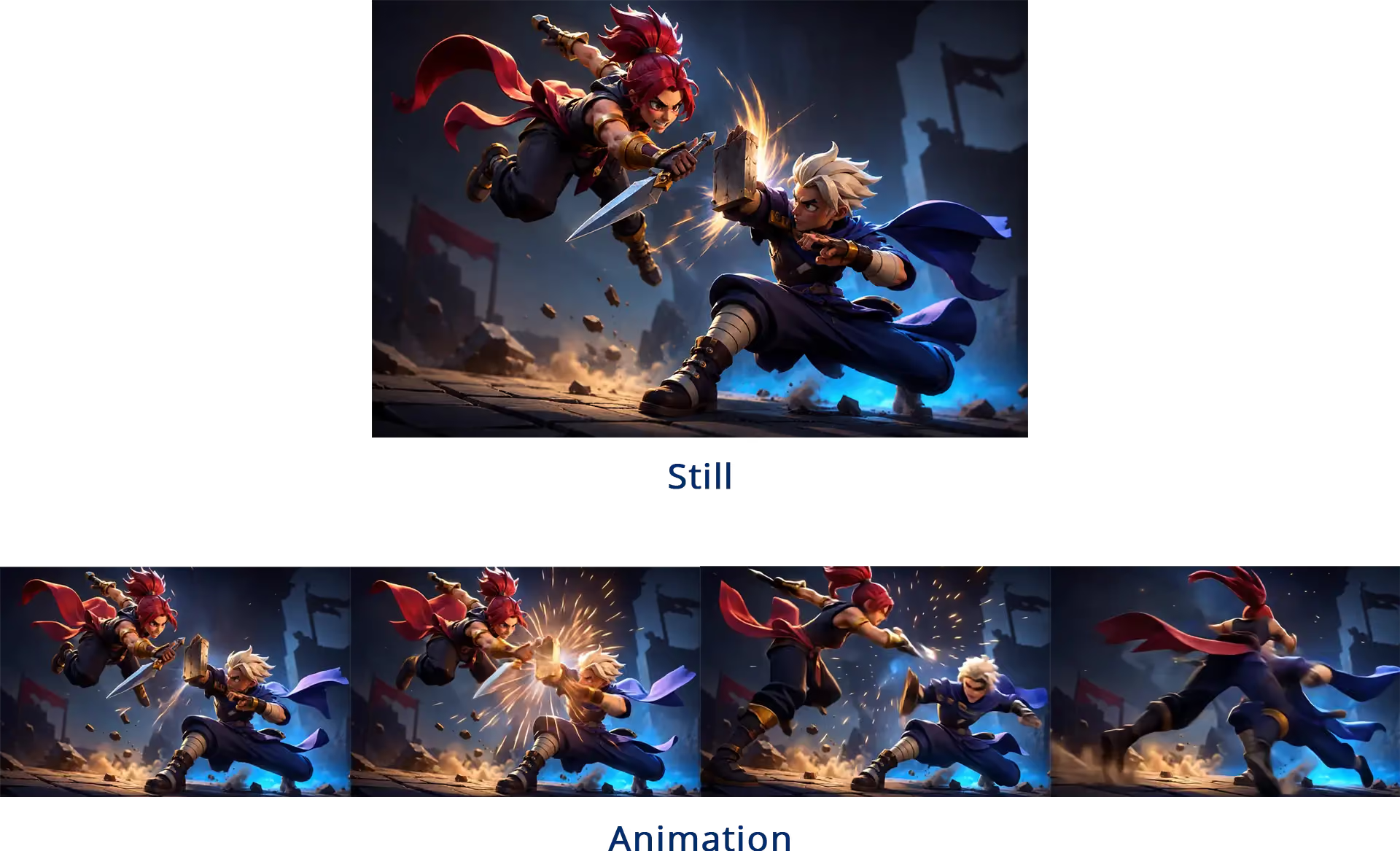
That changes how the project needs to be planned.
With 3D product rendering, an artist can concentrate on the composition of one final view. If the camera never sees the back of the object, for example, it may not need the same attention as the hero-facing surfaces.
Animation is less forgiving.
Once the camera starts moving around the product, more of the model may become visible. Reflections change from frame to frame. Materials need to remain convincing from different angles. Small modeling problems that disappear in one product render may become obvious during motion.
Animation also introduces timing.
How quickly should a mechanism open? When should the camera stop? How long does the viewer need to understand a feature? Should an exploded assembly pause before the components return?
Those decisions become part of the communication itself.
When stills are the better choice
Stills are usually the better option when the product can be understood from one or several carefully selected views.
Strong visual impact
A still gives the artist complete control over a single composition.
Lighting, framing, materials, reflections, depth of field, and background can all be designed around one purpose. This makes 3D product renders particularly effective for hero images and advertising visuals where the viewer needs to understand the product almost immediately.
This approach can also work extremely well for products where appearance, texture, or material quality is the main selling point.
In our 3D Art Spotlight featuring Felipe Pavani and Mike Laptev, Felipe's work on Brothers Desserts shows how far a still product visualization can go. His food-rendering work focused closely on textures such as creaminess, chocolate gloss, and the crumb of the cookies, with more than 40 hours spent sculpting one product.
That is a good example of why stills should not be viewed as the lesser option. When the objective is to make a viewer almost feel the material through an image, concentrating the effort into one frame can be exactly the right creative decision.
Faster production and approval
Stills usually involve fewer final outputs and fewer moving elements to review.
If a client wants a different material, background, label, product color, or camera angle, that change can often be made without checking hundreds of frames.
That makes stills useful for:
- product design reviews
- concept presentations
- ecommerce imagery
- quick campaign assets
- packaging previews
- print advertising
- multiple product variants
The project can also branch into several versions without necessarily rebuilding an entire animation.
When the viewer needs detail rather than movement
Sometimes the audience needs time to inspect a product.
A still lets viewers look at details at their own pace. That can be more effective than motion for showing material quality, craftsmanship, surface finishes, packaging design, or a specific feature.
This is where CGI product rendering and photorealistic visualization can be particularly strong.
If your goal is simply to make a product look convincing and desirable, animation may add production cost without adding much useful information.
When animation is the better choice
Animation becomes more valuable when the product needs to be understood over time.
Showing motion and function
A 3D product animation is particularly effective when a product has moving parts or a process that cannot be communicated clearly in one image.
This includes:
- mechanical assemblies
- opening and closing mechanisms
- adjustable components
- internal parts
- installation steps
- product transformations
- manufacturing processes
- before and after sequences
A product demo animation can show not just what the finished product looks like, but how it actually behaves.
That distinction matters in industrial visualization.
Pterobyt's work spans manufacturing and marketing, with a strong focus on product animations and industrial visualizations. Their animations are used across websites, social media, and large trade show displays. For manufacturers, animation can give sales teams something much more useful than an attractive image when the real value of the product lies in how it operates.
Their experience is explored further in our Pterobyt case study.
Explaining complex products
The more complicated the product, the more useful animation can become.
A technical product animation can remove exterior panels, separate an assembly, move the camera inside a device, or isolate individual components in ways that would be difficult or impossible to film.
This is where industrial animation, 3D industrial animation, and manufacturing visualization are especially useful.
A machine might look straightforward in a product render, for example, but its competitive advantage could be hidden inside the casing. Animation allows the presentation to move from the finished exterior to the internal components and then demonstrate the actual process.
Instead of explaining that sequence with several paragraphs of copy, the product can explain itself visually.
Product reveals and marketing
Not every product animation needs to be technical.
A product reveal animation or product showcase animation may exist primarily to create mood, anticipation, or visual impact.
Camera movement, lighting changes, close-ups, transitions, sound design, and pacing can turn the same product model used for a catalog render into a more cinematic marketing asset.
Mike Laptev's music-player project is a good example. What started as a Geometry Nodes experiment developed into a complete product design, and the final animation helped give the fictional device its identity and sense of function. You can see the project in our 3D Art Spotlight on Felipe Pavani and Mike Laptev.
In this type of project, movement is not simply decoration. It becomes part of the product presentation.
Production requirements
Stills and animation can begin with the same assets.
Both may use the same:
- 3D models
- materials
- textures
- lights
- cameras
- simulations
- render engine
The difference appears as production develops.
Rendering time
A still project may need only a handful of final frames. Animation can require hundreds or thousands.
At 30 frames per second, a 10-second 3D product animation video contains 300 frames. If one frame takes five minutes to render, the final sequence represents 25 hours of rendering before accounting for tests, revisions, or failed frames.
That is why a scene that feels perfectly manageable while producing stills can become a rendering bottleneck when turned into animation.
If you want a broader explanation of how this part of the process works, our guide to how rendering turns 3D scenes into finished images goes deeper into the rendering stage itself.
Storage and file management
Animation also creates more production data.
A sequence may involve:
- rendered frame sequences
- simulations and caches
- preview renders
- project versions
- edit files
- sound
- compositing assets
- final exports
Still projects are generally easier to organize because there are fewer outputs, although very high-resolution 3D product rendering can still create large files and complex scene assets.
Quality control
One of the biggest differences becomes obvious during review.
A still needs to look correct in one frame.
An animation needs to remain correct across the entire sequence.
Problems such as flicker, unstable reflections, clipping, simulation errors, sudden lighting changes, noise, missing assets, or awkward camera movement may only appear at particular points in the animation.
A good workflow therefore needs representative test frames rather than assuming that one successful frame means the entire sequence is safe to render.
This is also why planning and testing matter more as production becomes complex. Our about how a 3D production pipeline keeps projects moving covers that wider workflow in more detail.
Cost and budget considerations
Stills are generally less expensive when the project only requires one or a few final outputs.
There are fewer frames to render, less motion to create, and fewer stages to review. For product pages, print campaigns, design approvals, or a small advertising project, that may be all that is needed.
Animation normally requires more work.
The cost can include:
- animation and camera work
- simulations
- additional modeling or rigging
- rendering
- compositing
- editing
- sound
- revisions across multiple shots or frames
But cost should be judged against what the animation replaces.
If a product demonstration animation communicates in 20 seconds what would otherwise require several diagrams, photographs, paragraphs of explanation, and a live demonstration, the additional production work may be justified.
The same applies to products that do not yet physically exist. A 3D product video can become a sales, marketing, or investor asset before manufacturing is complete.
Creative control
Still renders give the artist precise control over one visual moment.
Animation gives the artist control over the order in which information is revealed.
That is a major difference.
With a still, composition guides attention spatially. With animation, the artist can guide attention spatially and over time.
A camera can begin with the complete product, move toward a detail, reveal an internal mechanism, demonstrate an action, and finish on the brand or hero view.
Neither method is inherently more creative. They simply offer different types of control.
Rendering challenges
Both formats can be demanding, but the bottlenecks are different.
Stills
For stills, the challenge often comes from pushing a single frame toward higher quality.
That may mean:
- higher resolution
- more samples
- detailed reflections
- displacement
- complex materials
- depth of field
- large textures
- heavy geometry
This is particularly common in photorealistic product rendering, where small material or lighting errors can make an otherwise accurate model feel artificial.
One of the Pterobyt projects rendered with us is a good reminder that still images can also become heavy jobs. Their large-format trade show visuals included 12 detailed high-resolution product renderings. A workload estimated at around 20 hours on a single workstation was processed in about 30 minutes using distributed rendering.
Animation
Animation adds the problem of scale.
A five-minute frame might not seem expensive when testing a product shot. Multiply it across hundreds or thousands of frames, however, and render time can quickly become the dominant part of the schedule.
Motion can also expose issues that a still never reveals.
Reflections may flicker. Simulation elements can behave differently between frames. Small geometry intersections suddenly become visible. A camera can move into areas of the model that were never meant to be seen from the original angle.
For a product animation video, testing motion and representative frames before the full render is therefore essential.
How to choose between animation and stills
Start with what the audience needs to understand.
Choose 3D product rendering when:
- appearance is more important than movement
- one image can communicate the product clearly
- the audience needs time to inspect details
- the deliverable is primarily for print, ecommerce, presentations, or static advertising
- you need several product variations quickly
- budget or turnaround is limited
Choose 3D product animation when:
- movement is part of the product
- you need to demonstrate function
- the viewer needs to understand a process or sequence
- internal components need to be shown
- the product needs a cinematic reveal
- the deliverable is a product video, social clip, trade show animation, explainer, or demonstration
A useful test is to remove the motion mentally.
If the message still makes complete sense as one image, a still may be enough.
If removing movement also removes part of the explanation, animation probably has a job to do.
Sometimes the best answer is both
For many commercial projects, choosing between animation and stills is a false choice.
Once a product has been modeled, textured, lit, and approved, the same assets can often support several deliverables.
A product launch could include:
- a hero still for the website
- several product renders for ecommerce
- a short 3D product animation
- vertical clips for social media
- close-up feature animations
- high-resolution images for print
- trade show visuals
- frames extracted from the animation for campaign graphics
The production work can therefore become a library of reusable visual assets rather than a single deliverable.
This approach is particularly useful for products that need to appear across multiple channels.
The stills handle situations where clarity and detail matter. Animation handles function, movement, and attention. Both come from the same underlying 3D product visualization work.
How a render farm can help
Rendering can become a bottleneck in either format.
Detailed geometry, high-resolution textures, reflections, complex materials, large images, depth of field, simulations, and demanding lighting can all increase render times. When those workloads become too heavy for a local workstation, a render farm can distribute the rendering across multiple machines and help shorten turnaround times.
The difference is how that workload scales.
For still images
With still rendering, external rendering power can be useful when the final image is extremely large or when higher-quality settings make a single frame impractical to render locally.
This can be especially relevant for:
- high-resolution advertising
- large-format print
- trade show displays
- architectural visualization
- CGI product rendering
- photorealistic product rendering
Artists can continue working locally instead of tying up their main workstation while final frames process.
For animation
Animation is naturally suited to distributed rendering because different frames can be processed across multiple machines at the same time.
That can make a major difference once a product animation grows from a few test frames into hundreds or thousands of final frames.
Pterobyt's experience is a useful example. As a small studio producing product animation and industrial visualization under tight client deadlines, moving the heavy rendering stage off local machines allowed them to keep working creatively while the frames processed remotely.
For revisions
The advantage becomes even more noticeable when a late change arrives.
A revised material or product component may require only one new frame in a still project, but an animation change can affect an entire shot.
Being able to render the updated sequence across multiple machines can prevent that revision from consuming the remaining production schedule.
Final thoughts
There is no universal winner between animation and stills.
3D product rendering is often the better choice when the goal is to present appearance, material, design, or a carefully composed product view.
3D product animation becomes more valuable when movement, function, assembly, transformation, or timing is part of the message.
The most efficient commercial workflows often use both.
A strong 3D product visualization project can produce still renders for product pages and campaigns, animation for demonstrations and social media, large-format images for events, and additional assets for future marketing without rebuilding the product from scratch.
The decision should therefore begin with a simple question:
What does the audience need to understand?
If one frame can answer it, create the strongest still you can.
If the answer only becomes clear when the product moves, changes, opens, assembles, or reveals something over time, that is where animation earns its place.
Register Now and Get $50 FREE Credits!
.avif)